Skip to Content
Qweb PDF Report Builder

Qweb PDF Report Builder

USDΒ 149.00
Add to Cart Buy Now
Direct Design - No XML Development

Visual Report Builder.
Design Directly. Bypass Code.
Live PDF. One-Click Publish.

Stop wasting hours writing QWeb XML, modifying paper formats in code, and compiling PDFs. Visual Report Builder enables functional consultants, administrators, and developers to drag, drop, and publish pixel-perfect reports directly in the Odoo interface.

Drag-and-Drop Canvas Upcoming: AI Layout Builder No XML Coding Required 3-Level Field Picker Real-time PDF Preview Version & Snapshot History
Visual Report Builder Interface
Drag-&-Drop Canvas
MM-precision grid editor
Upcoming: AI Layouts
Convert PDF/Image to layout format
Live PDF Preview
Direct render with actual data
100% Native Odoo
Zero external APIs or heavy rendering
Revolutionizing Report Development

Direct Design vs. Traditional Coding

Stop making Odoo reports "the old way." Let's compare how this visual designer changes everything for developers and businesses alike.

Traditional Coding Style

  • Write complex Qweb XML inheritance blocks by hand
  • Restart Odoo service and upgrade modules to apply changes
  • Manually define tables, columns, borders, and margins in code
  • No visual reference; guess pixel sizes and compile repeatedly
  • Requires professional Odoo developers for tiny updates or text tweaks
  • Risk syntax/evaluation errors that crash document printouts entirely

Direct Visual Builder Style

  • Drag & Drop: Place tables, text, barcodes, and lines on an intuitive grid
  • Zero Restarts: Apply edits live, save drafts, and publish instantly
  • Visual Configuration: Set font family, size, colors, and margins via sidebar UI
  • Live Rendering: Generate real PDF preview with actual records as you design
  • Empower Business Users: Let administrators manage layout, logos, and terms
  • Safe Logic Sandbox: Auto-built Jinja2 expressions are linted before saving
AI Layout Import Wizard
Roadmap v2.0 Release

Upcoming: AI Layout Builder

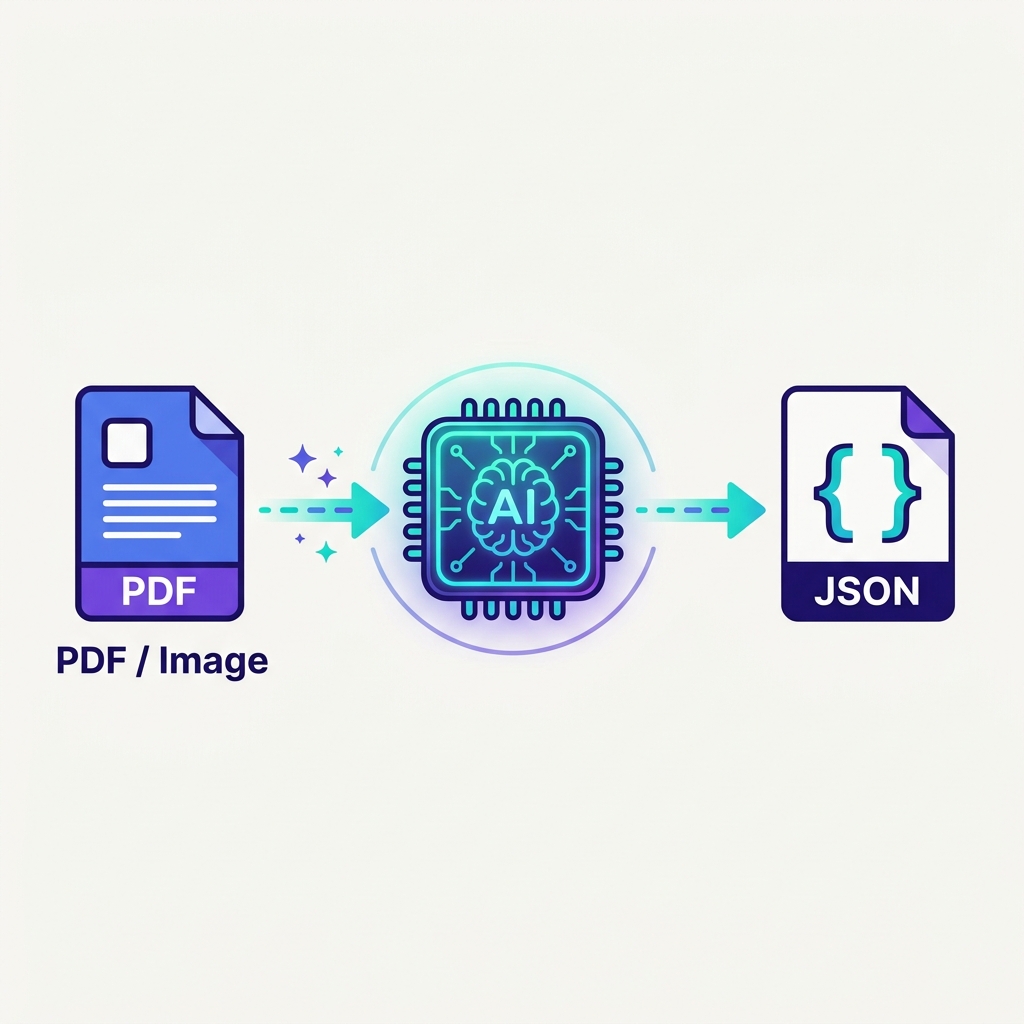
In our upcoming version, designing custom reports is completely streamlined. Just upload a PDF or an image of your target report design, and watch the AI convert it directly into a layout JSON file. Upload that file into Odoo, and your report configuration is fully complete and ready to print!

Upcoming AI Design Flow:
  1. Upload Reference: Provide a PDF file or an image/screenshot of your target report design.
  2. Generate Layout File: The AI converts your uploaded visual format into a structured JSON file automatically.
  3. Import JSON File: Upload the generated JSON directly in Odoo.
  4. Done! The report is instantly generated with correct spacing, margins, and headers.
πŸ”₯ Roadmap Lock-In Deal

Secure AI Features For Free - Purchase Now!

The AI-powered layout builder (JSON generation & auto-formatting) is under active development. Once released in version 2.0, the module price will increase. Purchase the module today at the current rate to secure your license, and receive the AI upgrade 100% free of charge!

Future Price: Higher Buy Current & Save Free Upgrades Included
Design Workflow

How the Builder Works

From report record to published view in 5 intuitive steps. Let's look at the lifecycle.

1

Native Launch

Open any report form (Invoices, Picking lists) and click Edit Layout to open the custom canvas.

2

Visual Arranging

Drag/resize labels, shapes, tables, and images. Align to a clean mm-scale grid reflecting actual page sizes.

3

Field Mapping

Open the Field Picker to browse relational models 3 levels deep. Drop variables directly into elements.

4

Real-time Preview

Click Preview to generate a real PDF in seconds. Review text positioning and tables with actual record data.

5

One-Click Publish

Publish to auto-generate underlying QWeb XML view overrides. Revert to draft or restore older history anytime.

Functional Walkthrough

See the Canvas in Action

Explore the layout builder features. Build layouts visually, browse database fields, perform instant previews, and import structures.

1. Native Entry on Action Reports

Click the Edit Layout button directly inside Odoo's native action report view. The system instantly initializes the canvas using the linked Paper Format (margins, width, and height).
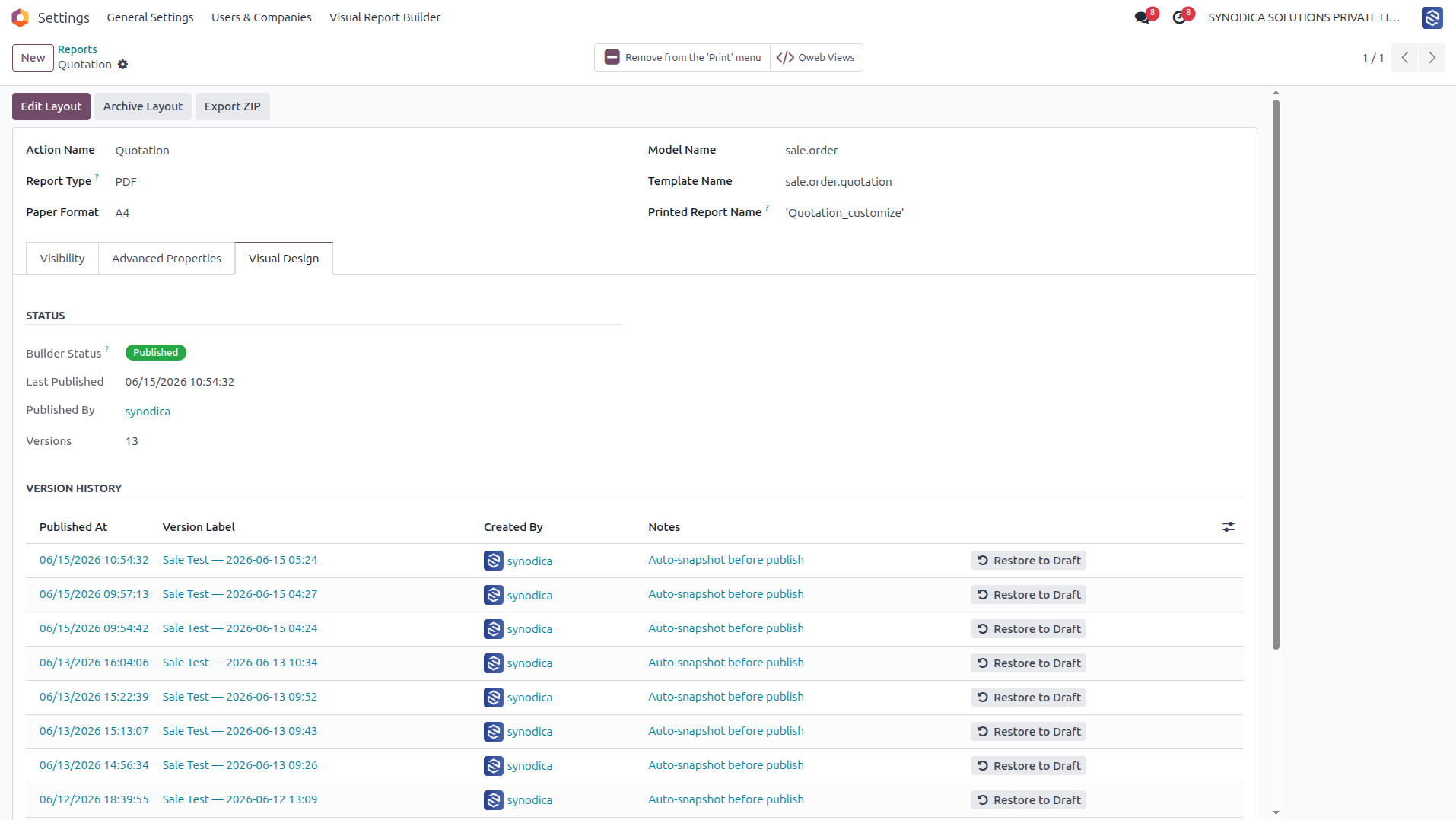
Report Form Header Integration

Settings β†’ Technical β†’ Reporting β†’ Reports β†’ Click Edit Layout

2. Drag-and-Drop Canvas & Zones

Arrange elements inside dynamic zones (Header, Body, Footer) on a precise millimeter-scale layout grid. Elements automatically stack, line up, or support absolute coordinate placements for billing headers and custom zones.
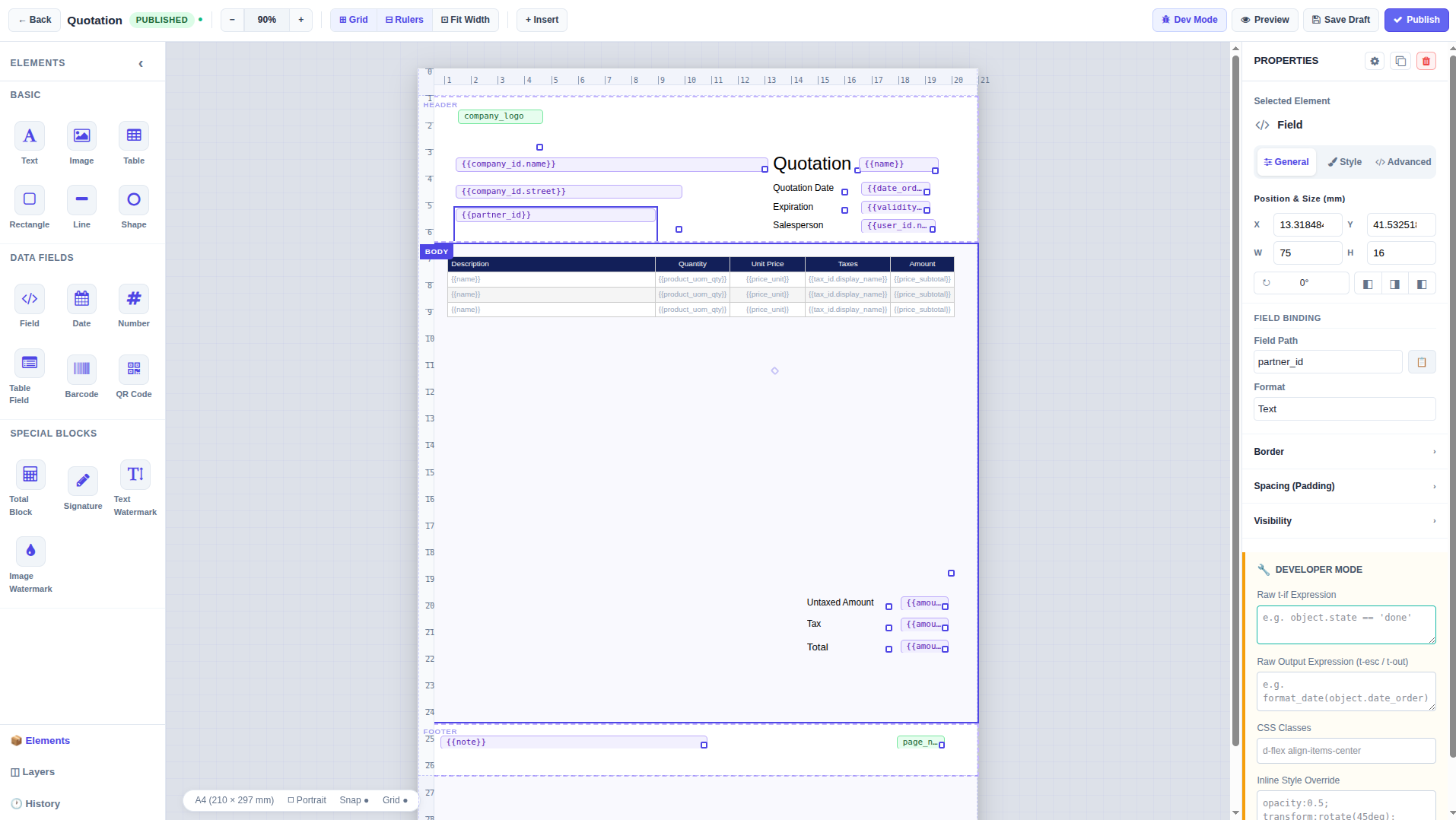
Visual Canvas Workspace

Millimeter Grid Canvas with Drag-and-Drop Elements & Zones

3. Insert Elements, Smart Fields & Snippets

Use the newly redesigned 3-column insert menu card to instantly drop static text, shapes, database-bound fields, barcodes, and smart fields (page number, print date) or advanced pre-styled snippets directly into the canvas.
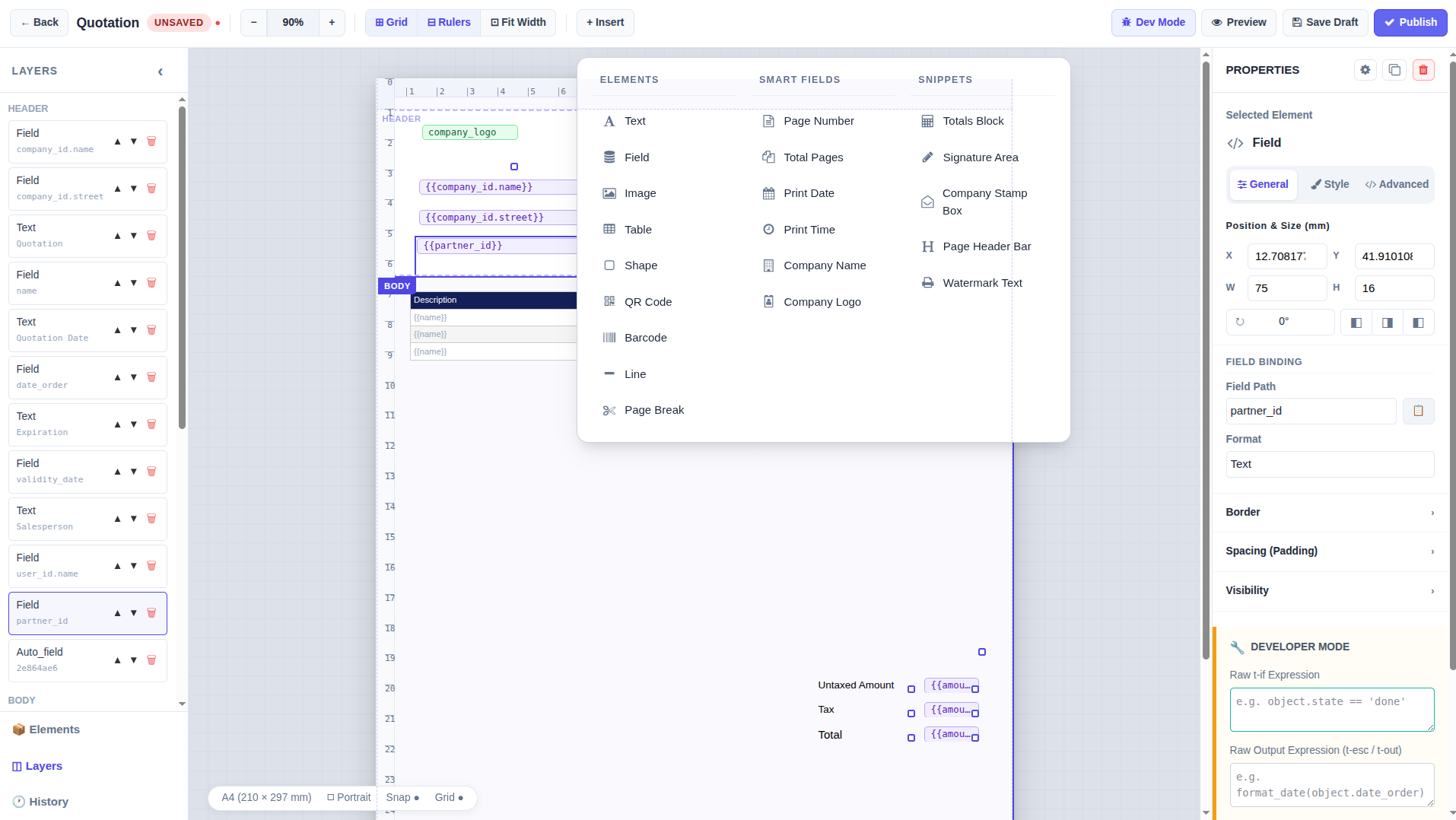
Structured Insert Elements & Snippets Dropdown

Redesigned 3-Column Component Insert Dropdown Menu

4. Relational Field Picker

Select any text block and click the Field Picker. Browse Odoo database fields, including relational fields (up to 3 levels deep like invoice_line_ids.product_id.name), and inject dynamic tags with a click.
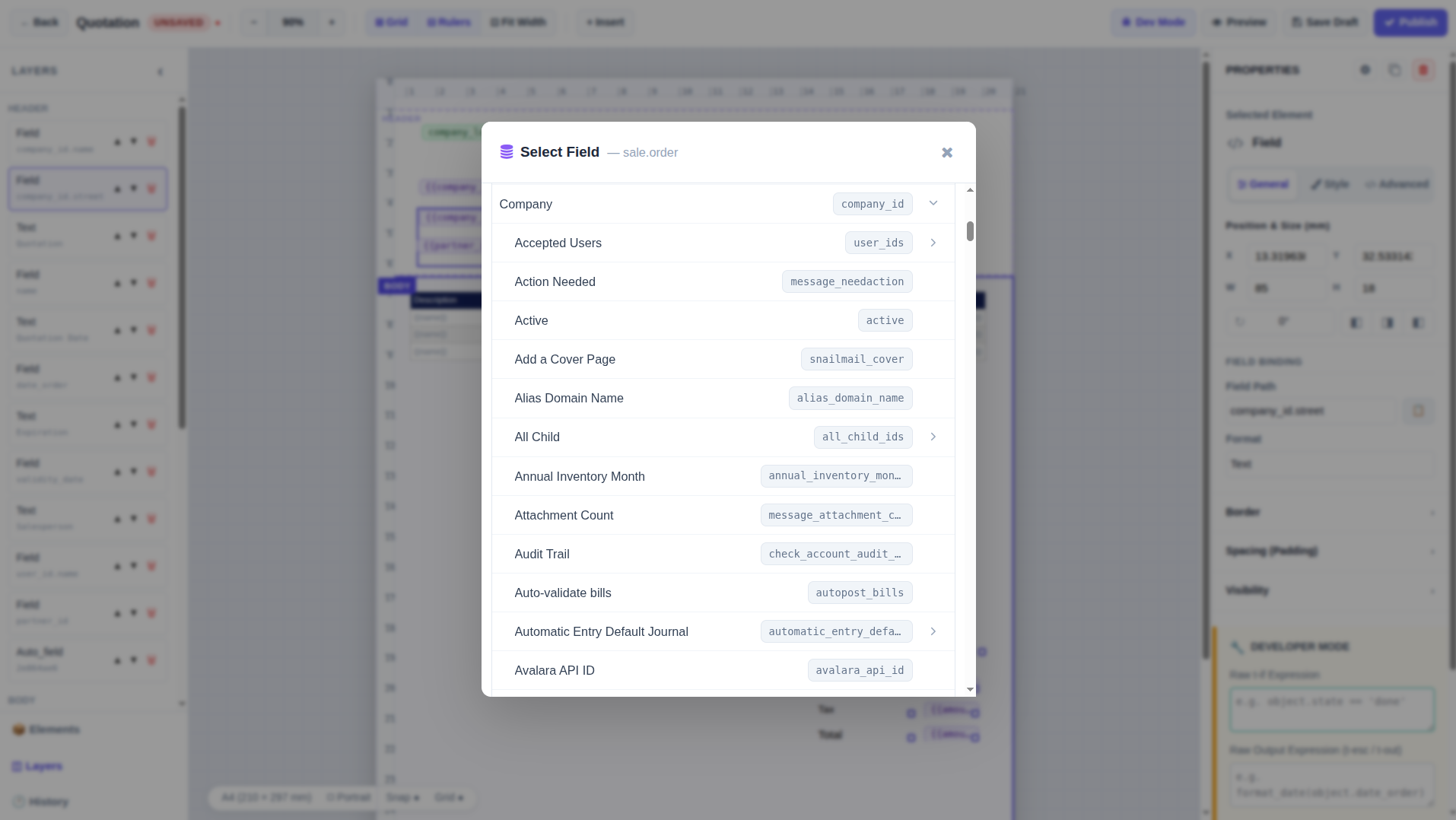
Database Relational Field Picker

Relational Fields Hierarchy Tree for Data Insertion

5. Convert PDF/Image to Layout JSON (Upcoming)

Simply upload a PDF or image of your desired report layout. The AI converts it into a structured JSON fileβ€”then just upload the file and the layout is fully built!
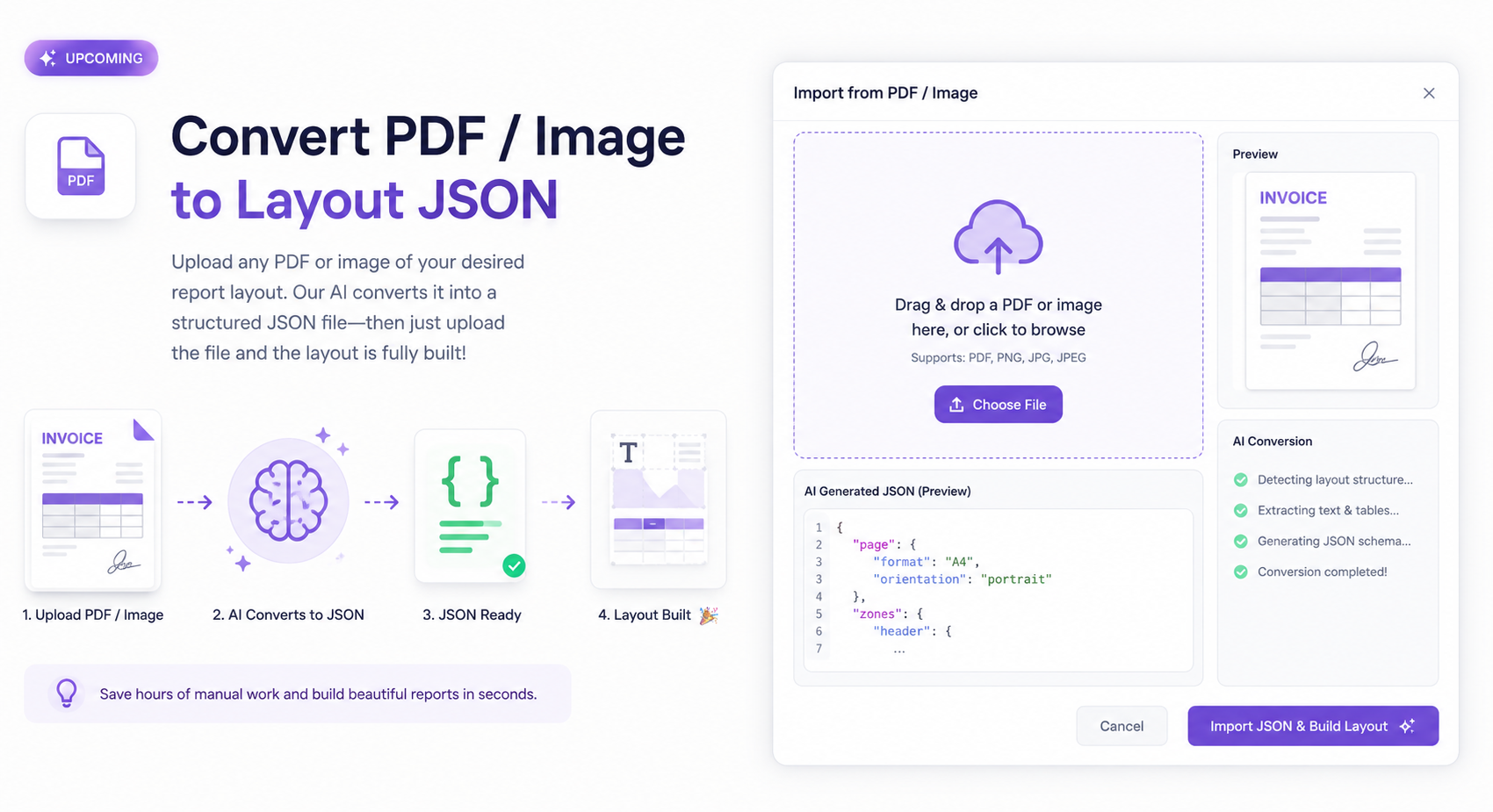
JSON Layout Import UI

Layout JSON Parser & Schema Generator Dialog

6. Instant Server-Side PDF Preview

No client-side approximations. Click Preview to let Odoo render a real PDF using active database records, giving you a 100% accurate visual representation of the printed document.
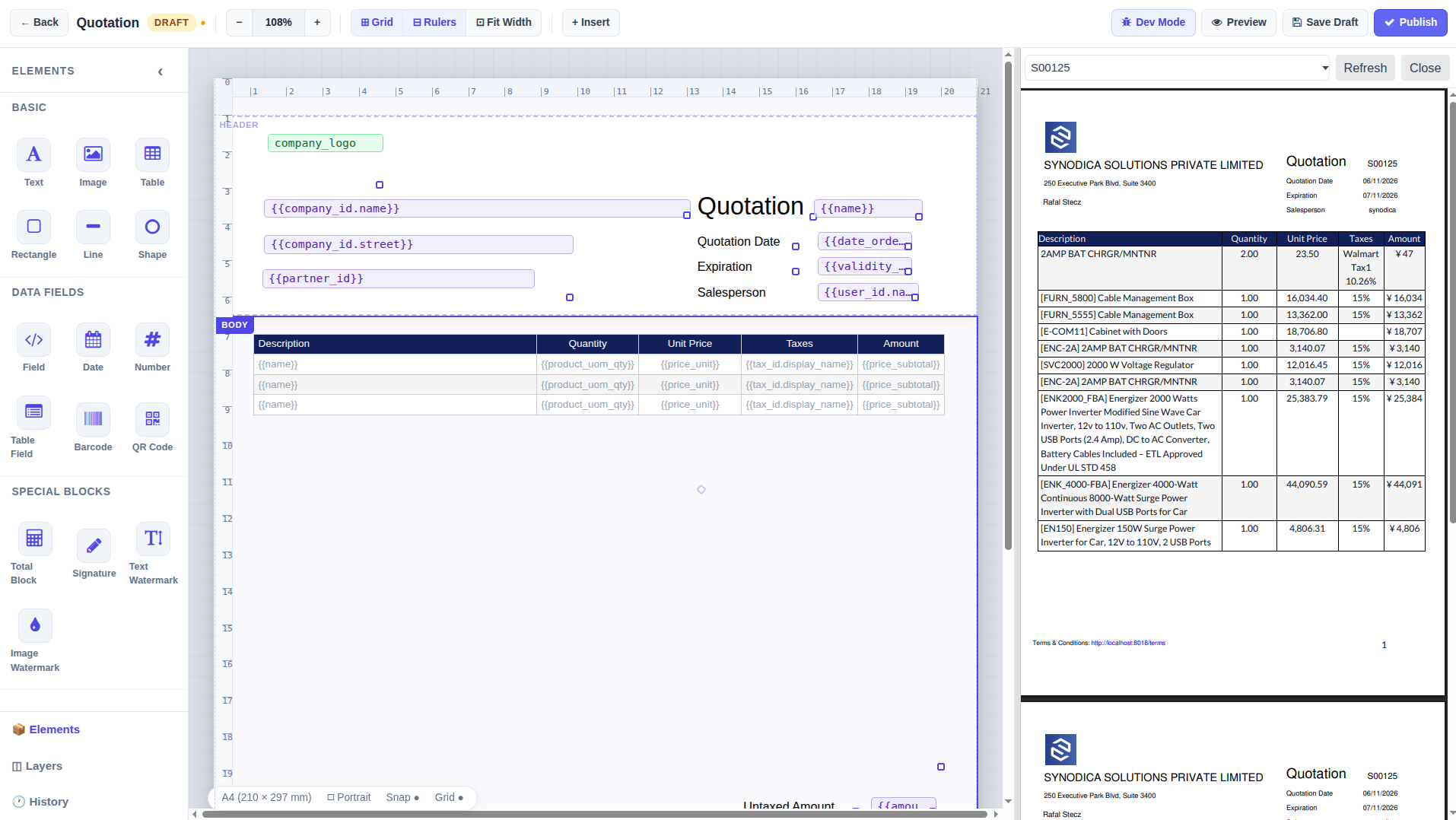
Live PDF Preview Panel

Side-by-Side Live PDF Compiled Canvas Layout

7. Native Report Selection & Print Execution

Once published, the customized report automatically registers in the Odoo Action framework. Standard users can generate the pixel-perfect layout with a single click from the standard native form view's Print menu.
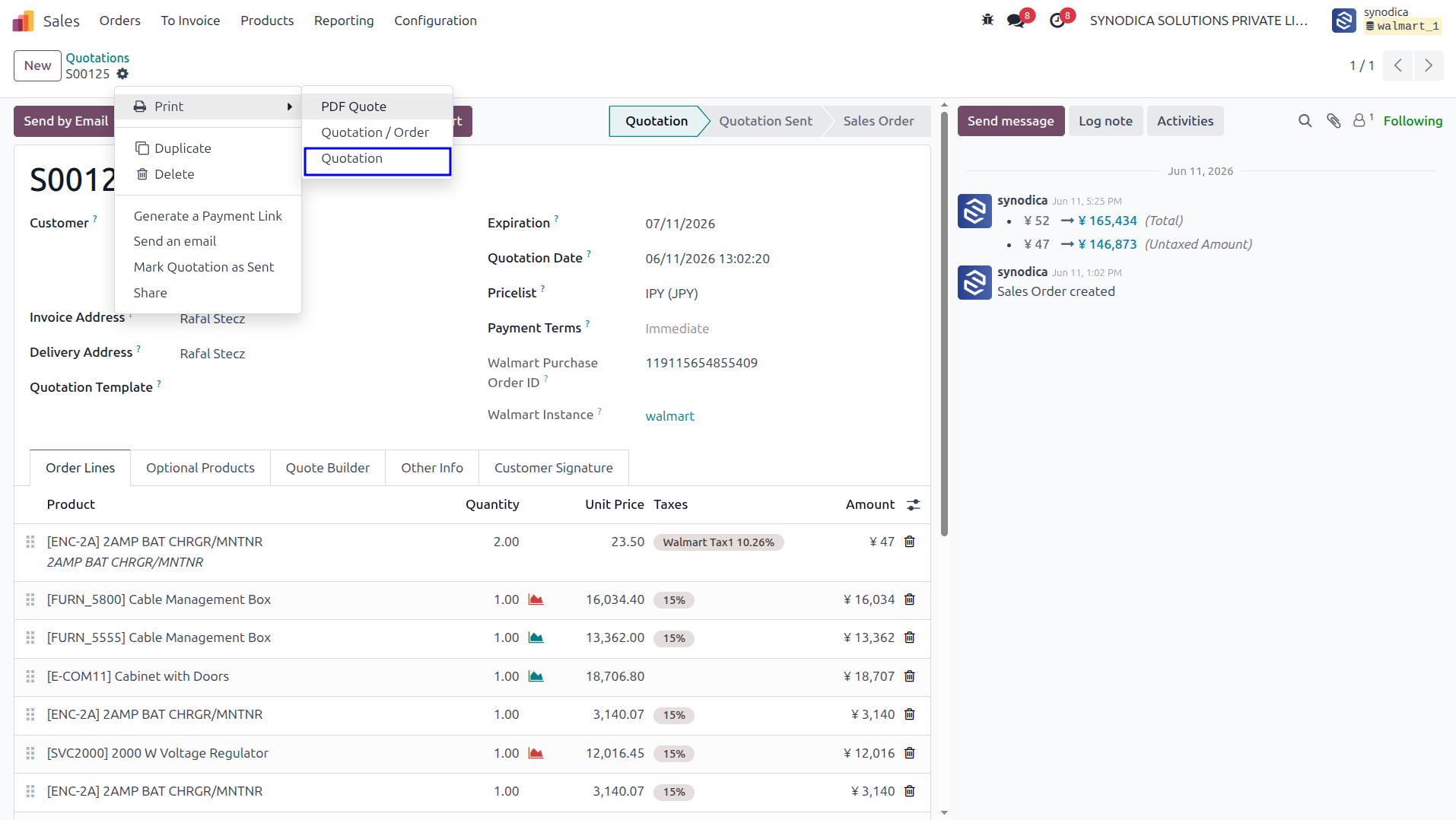
Odoo Native Quotation Print Dropdown Action

Print Customized Quotation Direct From Native Sale Order Form View

Key Capabilities

Ultimate Design Control

Experience direct report development inside Odoo with capabilities designed for both business professionals and developers.

​
Drag & Drop Editor

Place and scale text fields, dynamic tables, lines, shapes, and images visually. Custom grids ensure millimetric alignment.

​
Roadmap: AI Layouts

Convert PDF/Image layouts to JSON using AI, then upload them directly to auto-compile your visual reports. (Free upcoming update v2.0).

​
3-Level Field Picker

No need to memorize Odoo database field strings. Drill down through related records (M2O, O2M) up to 3 layers deep automatically.

​
Zone Management

Manage headers, footers, and body sections independently. Visual dimensions automatically scale to the report's paper orientation.

​
Version Snapshot History

Rollback layout changes instantly. Review visual differences between drafts and published versions, protecting layouts from loss.

​
Jinja2 Logic Linter

Need custom visibility or logic conditions? Use the developer mode expression panel, fortified with an on-the-fly syntax linter.

Synodica Solutions

Specialized Odoo Services

We build, customize, and maintain Odoo solutions for businesses worldwide - from implementation to advanced integrations.

Synodica Services

Ready to Build Reports Faster?

Banish slow manual QWeb coding cycles. Empower your team to modify invoice formats, quotation layouts, picking templates, and barcode labels visually inside Odoo.

Emphasise the features of the app.

Best Performance
Real-time Analytics
Get instant insights with powerful dashboards and real-time reporting capabilities.
Best Performance
Seamless Integration
Connect effortlessly with your existing tools and third-party applications.
Best Performance
Advanced Automation
Streamline workflows and reduce manual tasks with intelligent automation.
Feature Highlight
Best Performance
User-friendly Interface
Intuitive design ensures quick adoption and minimal training requirements.
Best Performance
Scalable Architecture
Grow your business without limits using our flexible and scalable platform.
Best Performance
24/7 Support
Expert assistance available round the clock to keep your operations running smoothly.

Emphasise the features of the app.

Feature Highlight
Best Performance
Smart Workflows
Optimize processes with customizable workflows tailored to your business needs.
Best Performance
Data Security
Enterprise-grade security measures to protect your sensitive business information.
Best Performance
Mobile Access
Manage your business on-the-go with full mobile compatibility and responsive design.
Best Performance
Cloud-based Solution
Access your data anywhere, anytime with reliable cloud infrastructure and automatic backups.

How it works

Step 1 Dashboard
STEP 1

Install & Configure

Install the app from Odoo Apps and configure initial settings to match your business requirements with our intuitive setup wizard.

Step 2 Dashboard
STEP 2

Customize Workflow

Tailor the workflows, automation rules, and user permissions to align perfectly with your team's processes and operational needs.

Step 3 Dashboard
STEP 3

Monitor & Optimize

Track performance through comprehensive analytics dashboards and continuously optimize your processes for maximum efficiency.

Emphasise the features of the app.

We create ERP solutions for you using Odoo ERP that will build a strong and efficient business for you. It's SYNODICA WAY